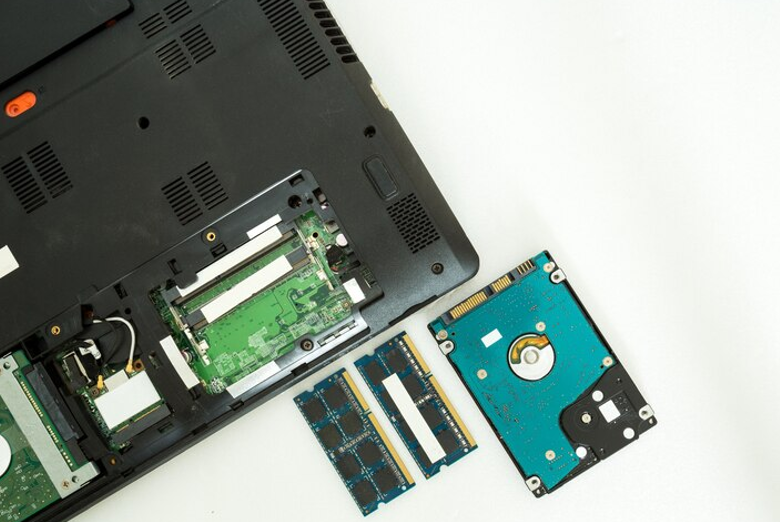
Large IT upgrades involve more than buying new servers or replacing older computers. Memory requirements can grow quickly across offices, data centers, workstations, and other systems. Planning the right Bulk RAM Supply helps businesses keep hardware upgrades organized, control costs, and avoid delays caused by missing or mismatched components. Ram Exchange supplies new, used, and refurbished RAM for different types of systems, making memory sourcing an option worth considering during a large technology project. A clear plan also makes it easier to match memory specifications, quantities, budgets, and delivery needs before orders are placed.
Start With a Clear Hardware Inventory
A large upgrade should begin with an accurate list of the equipment that will receive additional memory. Different computers and servers may require different RAM types, capacities, speeds, or configurations.
Before contacting a supplier, collect details such as:
- Server and workstation models
- Current RAM capacity
- Number of available memory slots
- Supported DDR generation
- Maximum supported memory
- Required module capacity
- Quantity of systems being upgraded
- Current memory configuration
This information reduces the risk of ordering modules that cannot be used. It also gives suppliers enough detail to understand the size and technical requirements of the project. For large environments, a spreadsheet can make the process easier. Group systems by model and memory requirement instead of treating every device as a separate order.
Check Compatibility Before Quantity
Buying a large quantity of RAM does not help if the modules do not match the systems being upgraded. Compatibility should be checked before an order is finalized. DDR2, DDR3, DDR4, and DDR5 are different memory generations. A system designed for one generation generally cannot use another generation simply because the module has a similar physical appearance.
Other specifications can also matter. These may include memory speed, module type, capacity, error correction features, rank configuration, and system requirements. For servers, businesses should pay close attention to the manufacturer’s memory specifications. Enterprise hardware can have requirements that differ from standard desktop computers.
A compatibility check should answer three basic questions:
- Does the system support the memory generation?
- Does the module capacity fit the system’s limits?
- Does the configuration work with the existing memory?
Checking these points early can prevent expensive ordering mistakes.
Estimate the Full Memory Requirement
Large IT projects often involve hundreds or thousands of modules. A small calculation error can create a shortage that delays deployment. Start by identifying how many systems need an upgrade and how much additional memory each system requires. For example, if 200 workstations each need an additional 16GB, the project requires 3,200GB of additional memory capacity.
The number of physical modules may still differ depending on the configuration. A system requiring 16GB could use one 16GB module or multiple smaller modules, depending on the available slots and manufacturer specifications. It is also sensible to keep a small quantity of compatible replacement modules for future failures or unexpected requirements. The exact reserve depends on the size and importance of the environment.
Consider New, Used, and Refurbished Memory
Budget can become a major factor in large hardware projects. Buying new memory for every system may not always be the only practical option. Businesses can also consider used or refurbished memory, provided the modules are properly tested and meet the required specifications. The decision should be based on system requirements, project budget, expected workload, and the supplier’s quality controls.
Ram Exchange offers new, used, and refurbished RAM across different applications. For a large upgrade, discussing available inventory and specifications with the supplier can help determine which options fit the project. The goal is not simply to find the lowest unit price. A lower purchase price may have little value if the memory is incompatible, unreliable, or difficult to replace later.
Think About Delivery and Stock Availability
Memory requirements can change during an IT upgrade. Equipment counts may increase, project schedules may move, or a specific module may become harder to source.For that reason, purchasing teams should confirm stock availability before finalizing an order. They should also discuss expected delivery times for larger quantities.
A useful purchasing checklist includes:
- Required quantity
- Exact module specifications
- Available stock
- Expected delivery date
- Replacement options
- Testing or warranty terms
- Packaging and shipping requirements
A supplier that understands larger orders can also help identify suitable alternatives if the original specification is unavailable.
Plan for Legacy Systems Too
Large upgrades do not always involve replacing every machine. Many organizations operate a mix of newer and older hardware. Some legacy systems may still support essential applications and cannot be removed immediately. This creates a need for different memory generations within the same organization. A purchasing team might need DDR3 for older servers while ordering DDR4 or DDR5 for newer equipment.
Maintaining a record of these requirements can prevent older systems from being overlooked. It can also help the business avoid buying large quantities of newer memory that cannot be installed in its existing equipment. For organizations managing mixed hardware environments, computer memory products may need to cover both current and legacy platforms.
Consider the Role of the Supplier
A bulk memory supplier does more than provide boxes of RAM. The supplier should be able to understand technical specifications, quantities, and project requirements. Good communication is especially useful when a project involves several system types. Providing complete hardware information allows the supplier to suggest available options without relying on guesswork.
Ram Exchange works with system integrators, data centers, and resellers and offers memory ranging from legacy technologies to newer DDR4 and DDR5 modules. For buyers managing larger requirements, that type of product range can simplify sourcing across different hardware generations. Clear communication also helps prevent misunderstandings about module capacity, quantities, condition, and compatibility.
See also: What Should You Do After a Hit-and-Run Accident in Denver?
Keep Testing in the Upgrade Process
RAM should be tested after installation, especially across large deployments. A problem with one module may not be obvious until the system is under normal operating conditions. IT teams can use their standard hardware diagnostics to check installed memory. Testing should be documented so that failed or problematic modules can be identified quickly.
For large deployments, it can help to install and test a small batch before rolling out the same configuration across hundreds of systems. This gives the technical team a chance to identify compatibility problems before the project reaches full scale. The testing process should cover both the physical installation and system-level recognition of the new memory.
Account for Future Expansion
An upgrade should not only address today’s requirements. Some systems may need additional memory later as workloads increase. If a server currently has free memory slots, the team should record that information for future planning. The same applies to workstations that may receive additional RAM after software or user requirements change.
Keeping accurate records of installed modules can make later upgrades easier. It also reduces the chance of buying incompatible memory because the original configuration has been forgotten. For larger organizations, maintaining a simple asset and memory inventory can save time during future projects.
Build a Practical Purchasing Plan
A large RAM order becomes easier to manage when the technical and purchasing teams work from the same information. The final plan should include the systems being upgraded, required memory specifications, quantities, approved alternatives, budget limits, delivery requirements, and testing procedures.
Using Bulk RAM Supply for a planned upgrade can help businesses coordinate memory purchases instead of handling individual orders for every machine. The process works best when compatibility and quantity are confirmed before purchasing decisions are made. The same planning method can also be applied to future hardware refreshes. Keeping accurate records means the next upgrade can start with reliable information instead of rebuilding the inventory from scratch.
Making the Upgrade Easier to Manage
A large IT memory upgrade does not have to become a complicated purchasing exercise. Accurate hardware records, compatibility checks, realistic quantity estimates, supplier communication, and post-installation testing can keep the process under control. For organizations handling different systems, computer memory products should be selected based on technical requirements rather than appearance or price alone. Working with an experienced supplier can also make it easier to source the right modules in the required quantities. Ram Exchange supports memory requirements across different hardware environments, including legacy and newer memory technologies. For a project involving large quantities, early planning gives the IT team more time to confirm specifications and avoid unnecessary delays.
Planning a large IT upgrade? Contact us today to discuss your RAM requirements, quantities, compatibility needs, and available memory options for your project.
